
Your Sailing Videos, Finally Useful
The coach films from the RIB. A sailor records from the bow. Someone else shoots a few clips between races. By the time you're back at the dock, there are forty videos spread across five phones.
Someone suggests a WhatsApp group. Someone else creates a Google Drive folder. A week later, you're staring at a list of files named IMG_4872.MOV through IMG_4913.MOV, trying to figure out which one has the start of race three.
Capturing video isn't the problem — everyone has a great camera in their pocket. The problem is that once you've filmed it, the video goes nowhere useful.
Until now.
Upload your videos. They become part of the replay.
ChartedSails now lets you upload videos directly to the server — from your phone, right after sailing.
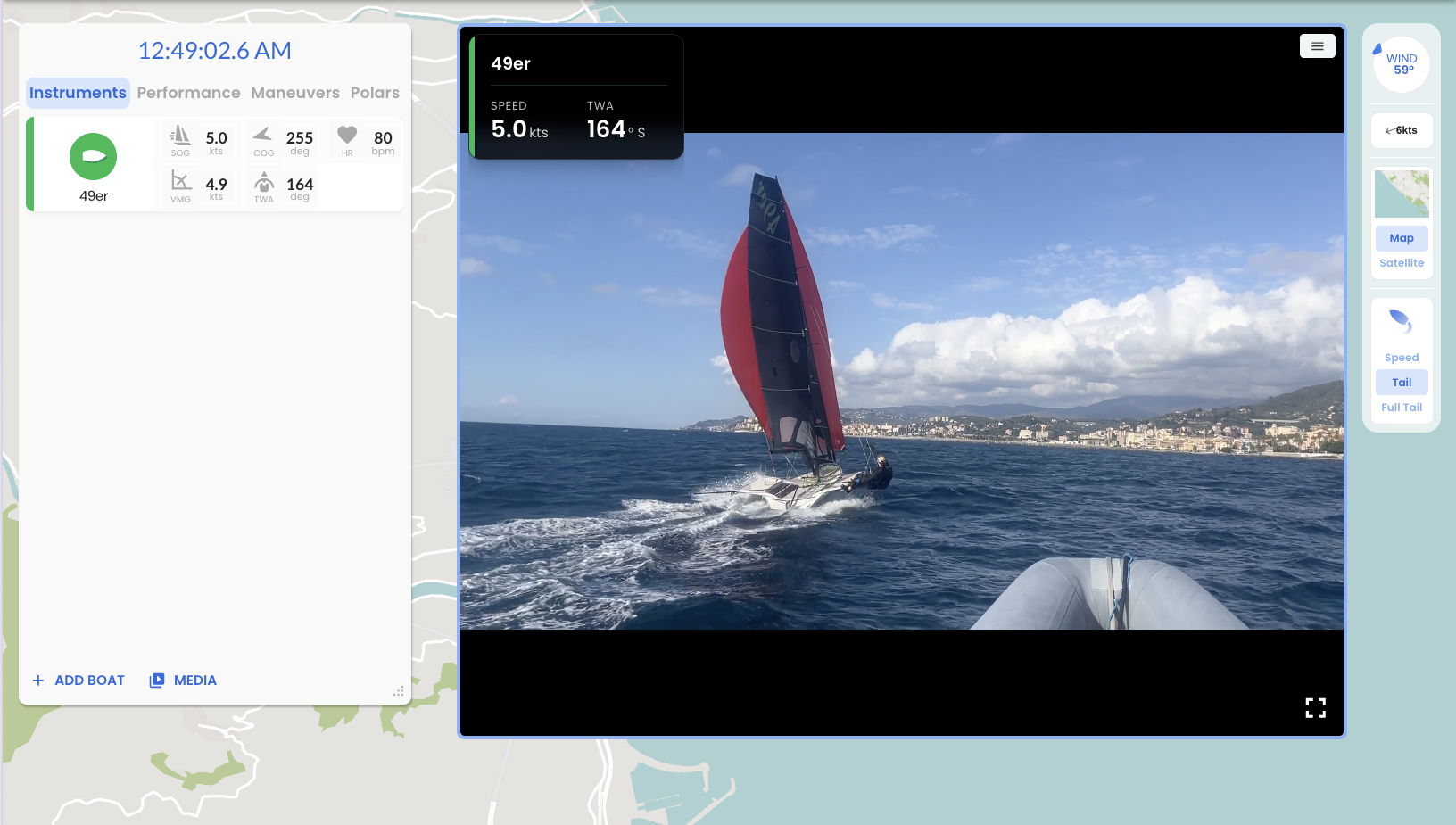
Open any session, tap the MEDIA button, and drag and drop your videos. ChartedSails reads the timestamp from the file and synchronizes the video to your sailing data automatically. That's it.
You can upload from the web or directly from your phone. Either way, the videos live on the server — they're just there, every time you open the session.
On mobile, it's even better. Open the app, and your videos are right there in the replay. It's like scrolling TikTok, except it's you — you're kicking ass on the water, and you have the numbers to prove it.
Click on a moment. The right video plays.
Open the replay, scroll to the start of race three, and click. If there's a video for that moment, it starts playing — synchronized to your track.
You see the video alongside your speed, heel angle, and pitch. A mini map shows the boat moving in real time. The data and the video tell the same story, at the same time.
No more scrubbing through unnamed files to find the right moment. No more guessing what was happening in that clip. The replay becomes the index for all your video.
This changes the debrief completely. Instead of "let me find that video where we messed up the tack," it's "click here — watch."
From your phone to the replay in seconds

The fastest way to get video into ChartedSails is to upload directly from the phone that filmed it. Open the session on your phone, tap the plus, and pick your clips. The original files keep their timestamp metadata, so synchronization is automatic.
This works beautifully with iPhone video — the quality is excellent and the metadata is always there.
One important thing: don't send videos through WhatsApp or Messenger first. These apps re-encode the video and strip the timestamp metadata, which means ChartedSails can't sync them automatically. If you need to transfer videos between devices, use AirDrop or share them via Google Drive. These preserve the original file and its metadata. But honestly, it's just easier to install the app and have everyone upload their own videos directly.
What if the timestamps don't match?
Sometimes video timestamps are off — especially with action cameras or drones. ChartedSails has a re-sync tool that lets you manually align the video to your data. Select a recognizable moment in both the video and the track, and the tool shifts all your video at once.
Share the link. Everyone sees the video.
Because the videos are on the server, sharing is simple. Send the session link to your teammate, your coach, or your class association — they open it and see everything, including the video.
No more passing files around. No more "can you send me that clip?" No more Google Drive folders that nobody remembers to check.
And if a sailor wants to keep a video because it's a great clip? Long press on the video in the mobile app to download it straight to your photo gallery.
Storage and limits
Every ChartedSails subscriber gets 1,000 minutes of video storage — that's more than 16 hours. Videos are kept on the server for 90 days. After that, they're automatically removed from the server, but you can still play synchronized video from your local files.
If you're a team or a club, our group plans include video uploads for everyone on the team. And we're happy to offer more capacity and longer retention — book a quick call and we'll figure out what works for you.
Photos too
Video gets all the attention, but you can upload photos the same way. They're timestamped and appear in the replay timeline, so you can scroll through your session and see exactly when each photo was taken.
"I used to film every gybe from the coach boat and then spend the evening trying to find the right clips to share with the team.
Now I upload the videos from my phone, and when we debrief, I just click on the gybe in the replay — the video plays with the speed and heel angle right there.
This makes things easier and much clearer for sailors."
Giovanni Bonzio - 49er Olympic Coach - SailAddiction.com
Try it on your next session
Video upload is available to all ChartedSails subscribers. If you don't have an account yet, start a free trial — record your next session, upload your videos, and see what your sailing looks like when the data and the video come together.
If you've been using ChartedSails without video, this is the upgrade you didn't know you were missing. Open your last session, tap the plus, and upload a clip. It takes ten seconds to see why this changes everything.