
Download an Activity from Garmin Connect
Need to export old activities manually? Learn how to export a FIT file from Garmin Connect and drop it into ChartedSails.
If you have not connected your Garmin account to ChartedSails, or if you want to import an older activity, you can manually download it from Garmin Connect and upload it to ChartedSails.
Step 1: Open Garmin Connect
Go to connect.garmin.com on your computer and log in to your Garmin account.
Step 2: Find and export your activity
- Click on Activities to see your activity list
- Find the sailing activity you want to download and click on it
- Click the gear icon (⚙) in the top right corner
- Select Export Original to download the activity in FIT format
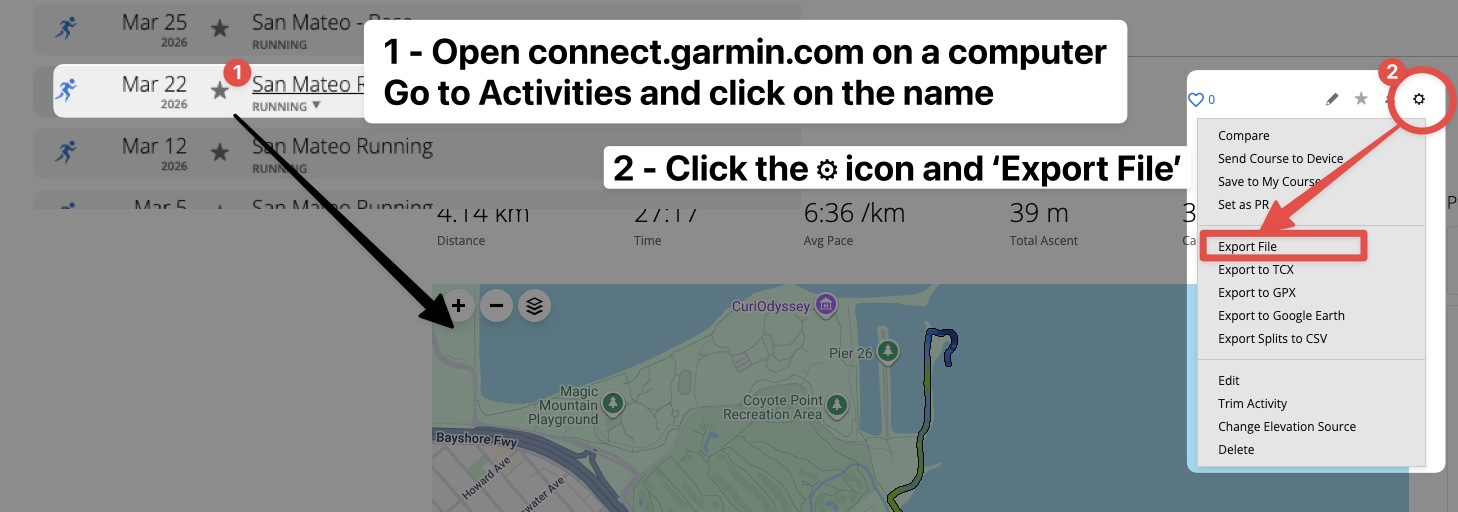
The FIT file will be downloaded to your computer.
Step 3: Upload to ChartedSails
Go to ChartedSails and drag the FIT file onto the page, or click Import and select the file.
Your sailing session will be processed and ready for analysis within a few seconds.
Video walkthrough
Coming soon: A short video showing the complete process.