
Preparing Your Sailing Data
Before you can analyze your data, we need to do a little bit of preparation and organization. ChartedSails makes this easy and intuitive.
Getting Your Data Into ChartedSails
How your data gets into ChartedSails depends on how you recorded it.
ChartedSails mobile app: If you recorded with the app, your data uploads automatically at the end of your session. There's nothing extra to do — just open ChartedSails on the web or on your phone and your session is ready.
Garmin watches: If you've connected your Garmin account, your sailing activities sync automatically. You don't need to touch anything — just sail, and your data appears in ChartedSails.
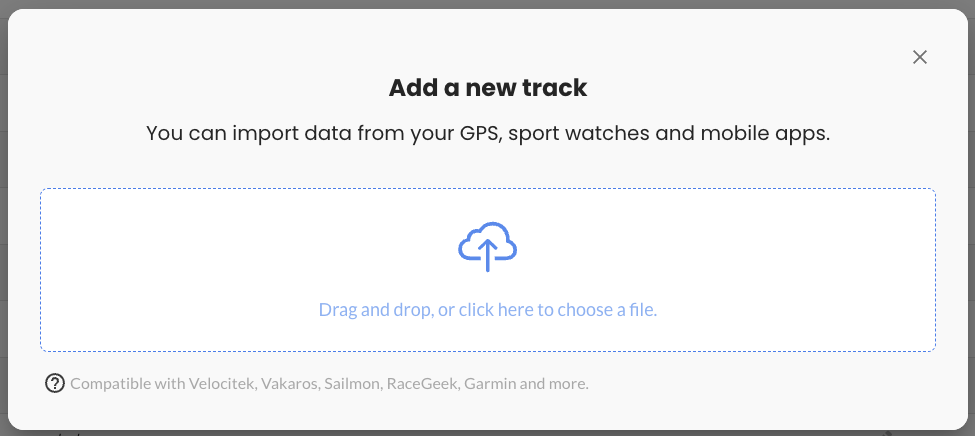
Dedicated GPS devices (Velocitek, Vakaros, etc.): Export the file from your device and upload it to ChartedSails. Click the "UPLOAD" button on your dashboard and drag and drop your file into the upload area. ChartedSails will automatically detect the file type and start processing it.
After processing, ChartedSails will ask you to provide some information such as the name of the boat. If it's the first time you upload data for this boat, the program will also ask you to provide the boat type and the sail number. The boat type is important to properly represent the length of the boat and will also be used for some racing analysis.
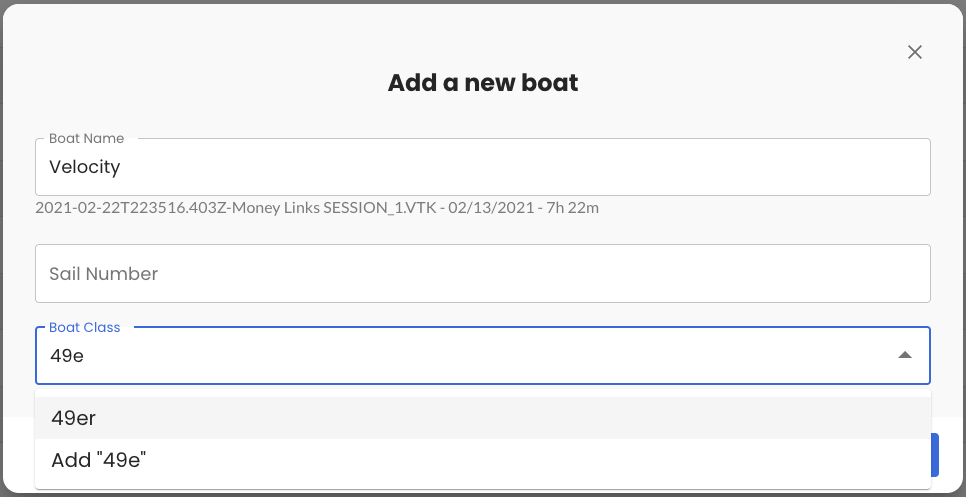
If your boat class does not already exist, you can quickly add it.
Add More Boats
If you were not sailing alone, the easiest way to get everyone's data together is through groups. When you're all in the same group, data from the same sailing day comes together automatically.
If you already have the files for other boats (for example, a coach collected everyone's data), you can add them directly with the "ADD BOAT" button and repeat the upload process.
Tracking the Marks
Accurate mark positions make a big difference in race analysis. There are a few ways to get mark positions into ChartedSails:
From the ChartedSails mobile app: Ping the marks as you pass them during the race. The app records the position, which ChartedSails uses automatically when you set up the race.
From your GPS device: Velocitek and Vakaros devices also record mark pings. These are loaded automatically when you upload your data.
From a separate GPS file: If someone recorded the mark positions with a separate device, you can upload the file (VKX, GPX, etc.) and assign it to a boat named "mark 1" (or any name you choose). ChartedSails will recognize it as a mark — it won't appear in the list of boats and will be used for race analysis.
Provide Wind Direction
Sailing insights depend heavily on the wind direction. ChartedSails automatically fetches weather data for your session location, giving you a baseline wind direction and conditions for the day.
If you have wind instrument data from your GPS device, ChartedSails will display this as instrument data and on the graphs, giving you even more precise wind information.
You can also set the wind direction manually using the rotating compass in the top right of the screen — rotate the map until the wind is coming from the top.

Trim Your Session
It regularly happens that we keep the GPS recording on the freeway back home and this makes for some disturbing maximum speed.
You can easily trim-off data before and after sailing with the "EDIT" button.

We recommend keeping the entire day of sailing. From leaving the dock until you return to the dock. We will discuss later how to highlight specific races in the day.
Tips to Make the Most of Your Data
Your GPS will capture most of the technical information, but we've learned that a few simple notes during your sailing day will make a huge difference in transforming that data into real improvements.
5 Key Things to Record During Your Sail
Even the best GPS can't capture everything. Here are the critical details to note during your sailing session:
Crew Information Who was on board? Different crew weights and skills affect performance.
Sail Configuration Which sails did you use? Note any changes made during the session.
Weather Conditions Note wave conditions and any significant changes throughout the day. ChartedSails fetches wind data automatically, but your own observations about gusts, shifts, and sea state add valuable context.
Start Times Modern sailing GPS devices and the ChartedSails app capture this automatically with the race timer. If yours doesn't, write down the exact time of all starts.
Experiment Details Working on improving jibes? Trying different heel angles? Note the time and nature of any technique experiments you try.
How to Capture These Notes
The easiest way is to use the Comment feature in the ChartedSails mobile app. You can add comments while sailing — tap the comment button and speak or type a quick note. Your coach can also add comments from their device during the session.
Other simple options:
- Use a small waterproof notebook
- Take quick voice memos on your phone
- Snap photos of the crew, whiteboard and sails with your phone
Here's what effective notes might look like:
April 12 - Team: Alex, Maria, Thomas
- 12:30-1:00: Light wind 8-10kts, flat water, tested new jib trimming technique
- 1:15: Wind shifted +15°, increased to 12-14kts
- 1:30-2:45: Five practice starts, working on acceleration
- 2:50-3:30: Three races, using higher pointing angle upwind
Adding Your Notes to ChartedSails
When you first open your session in ChartedSails, add your notes:
In the session title (e.g., "J/70 Training - 15-18kts - New jib")

Using the notes feature on the timeline
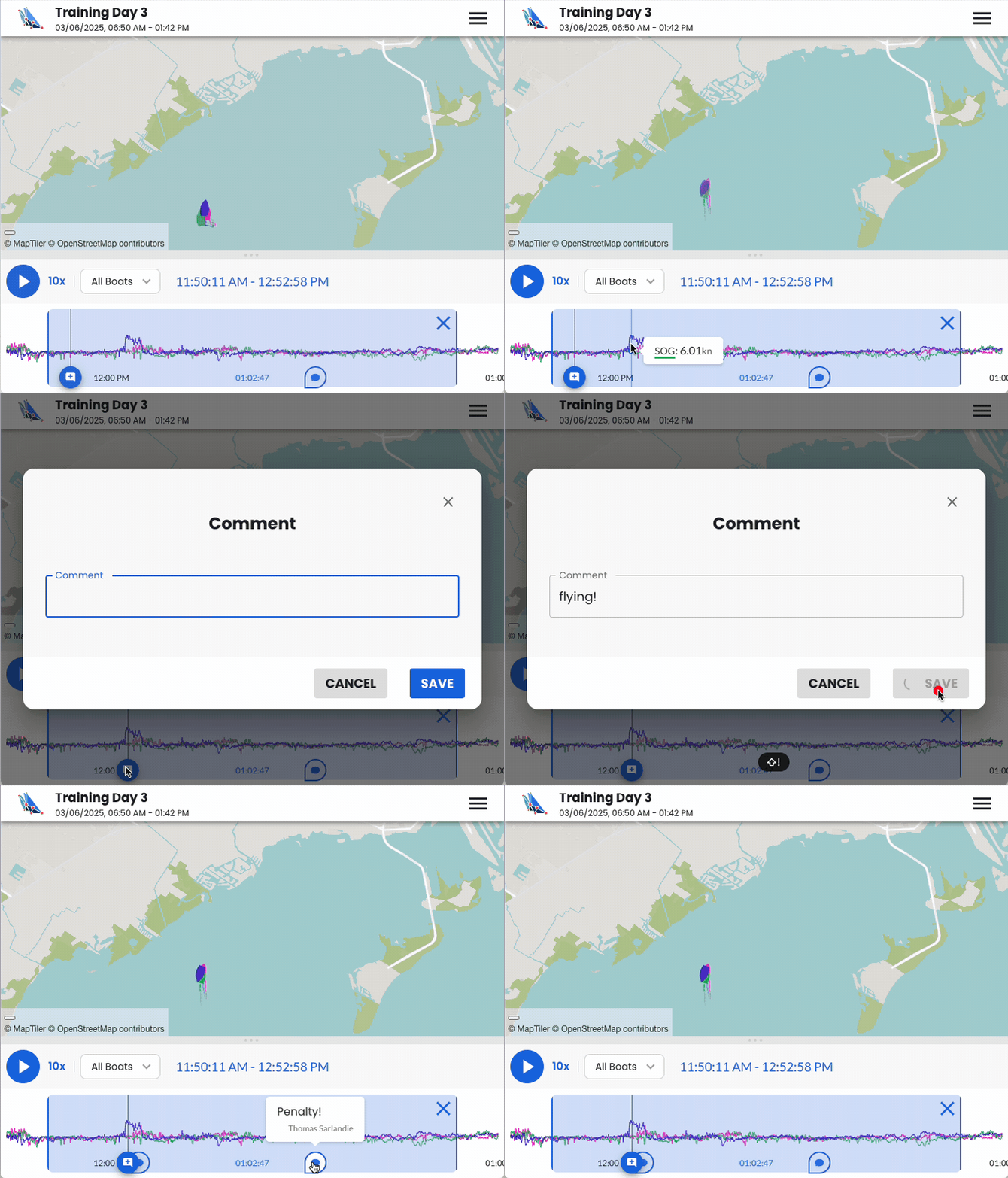
Create highlights on the timeline to quickly find interesting moments
Action Step
Before your next sailing session, create a simple template for your notes. Having a structure makes it easier to jot down the important details quickly.
Now that you've learned how to prepare your data, you're ready to move on to understanding the tools of the trade that will help you sail faster.